In this material
What Secure Boot does
At power-on the firmware checks the signature of every piece of boot software: UEFI drivers of expansion cards, EFI programs, the loader of the operating system. Valid signatures let the PC boot and hand control to Windows (Microsoft Learn). A file without one, or with a signature from the revoked list, does not start.
The target is a bootkit, code that runs before Windows and before the antivirus. Cheats use the same route, which is why anti-cheats ask for Secure Boot: EA says it counters cheats that get in during the Windows boot process (EA). It checks only the start, not Windows once it runs.
Secure Boot, UEFI and TPM 2.0
| Term | What it is |
|---|---|
| UEFI | the firmware of the motherboard that replaced the old BIOS; Secure Boot is one of its settings |
| CSM, or Legacy | a UEFI mode that imitates the old BIOS and boots MBR disks; it has to be off for Secure Boot |
| TPM 2.0 | a security chip or a module in the processor’s firmware (Intel PTT, AMD fTPM) that stores keys and records what loaded at boot |
Secure Boot blocks unsigned code, and the TPM gives an anti-cheat a signed report that the boot was clean (FACEIT). Windows 11 requires TPM 2.0 and firmware that is “UEFI, Secure Boot capable” (Microsoft Learn): the PC must support Secure Boot, but Windows 11 runs with it off (Microsoft Support).
MSI ships X870, X670, B850 and B650 boards with Secure Boot and TPM 2.0 on; Gigabyte says they are usually on for AM5 boards with Windows 11. More on the firmware: what BIOS and UEFI are, what a motherboard does.
Games that require Secure Boot
On the publishers’ support pages as of November 2026:
| Game or platform | Requirement on a Windows PC | Source |
|---|---|---|
| Valorant | TPM 2.0 and Secure Boot on Windows 11 | Riot Games |
| Battlefield 6 | Secure Boot on Windows 10 and 11 | EA |
| EA Sports FC, other games with EA Javelin anti-cheat | Secure Boot on Windows 11 | EA Help |
| Call of Duty: Modern Warfare 4, Warzone | TPM 2.0 and Secure Boot for any online mode | Activision |
| Call of Duty: Black Ops 7 | TPM 2.0 and Secure Boot for Ranked Play and some playlists | Activision |
| FACEIT, CS2 matches included | TPM 2.0 and Secure Boot for all players since 25 November 2025 | FACEIT |
| Fortnite tournaments | TPM 2.0 and Secure Boot to enter | Epic Games |
Valorant without it shows VAN 9003: “This build of Vanguard requires secure boot to be enabled in order to play” (Riot Games). On Windows 10, Call of Duty needs version 22H2 or later.
How to check if Secure Boot is on
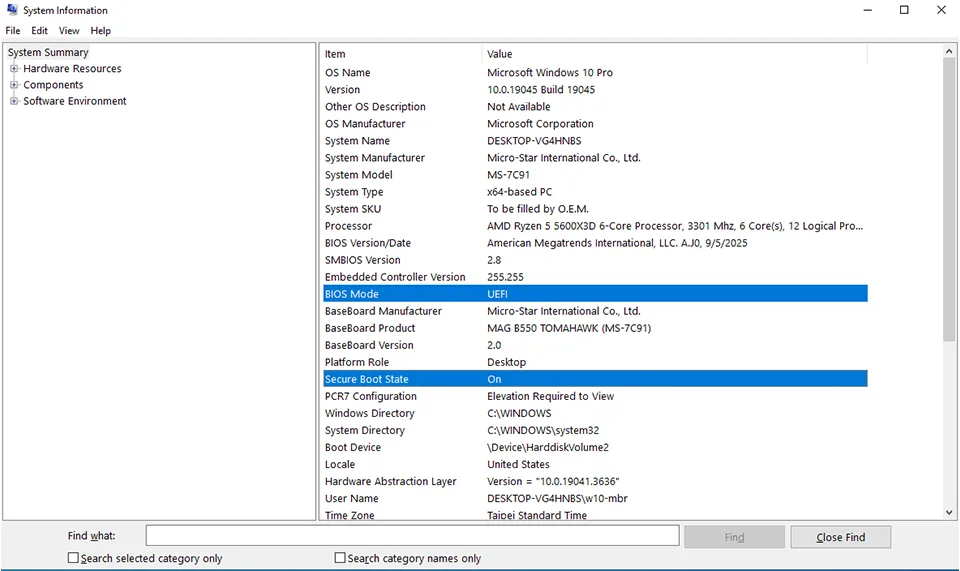
- Press Win+R, type msinfo32, press EnterSystem Information opens on System Summary.
- Find BIOS ModeYou need UEFI. Legacy means the PC boots the old way, usually from an MBR disk.
- Find Secure Boot StateOn: done. Off: turn it on in the firmware. Unsupported: check the board's manual for Secure Boot.
In PowerShell run as administrator, the first command answers True (on), False (off) or “Cmdlet not supported on this platform” (a BIOS PC or no support) (Microsoft Learn). The second shows MBR or GPT under Partition Style (Microsoft Learn).
Confirm-SecureBootUEFIGet-Disk | ft -Auto
How to turn on Secure Boot
It works only when Windows boots in UEFI mode from a GPT disk (MSI). Games check TPM 2.0 too: tpm.msc should say “The TPM is ready for use” (Activision).
- Convert an MBR disk to GPTBack up your files and run the commands below in Command Prompt as administrator. MBR2GPT keeps the data, accepts at most three primary partitions and cannot be undone.
- Open the firmwareSettings, System, Recovery, Restart now next to Advanced startup, then Troubleshoot, Advanced options, UEFI Firmware Settings. Or press the key your board names at power-on.
- Switch the boot mode to UEFITurn CSM off. On MSI and Gigabyte boards the Secure Boot option appears only after this.
- Enable Secure Boot and saveMenus differ by maker, see below. Then check msinfo32 again.
mbr2gpt /validate /allowFullOSmbr2gpt /convert /allowFullOS
ASUS
- Press Delete at power-onThe BIOS opens in Advanced Mode.
- Boot, Secure Boot, OS Type: Windows UEFI modeOther OS means Secure Boot is off.
- Still not activeSecure Boot Mode: Custom, Key Management, install the default Secure Boot keys.
- F10, OkThe PC restarts.
MSI
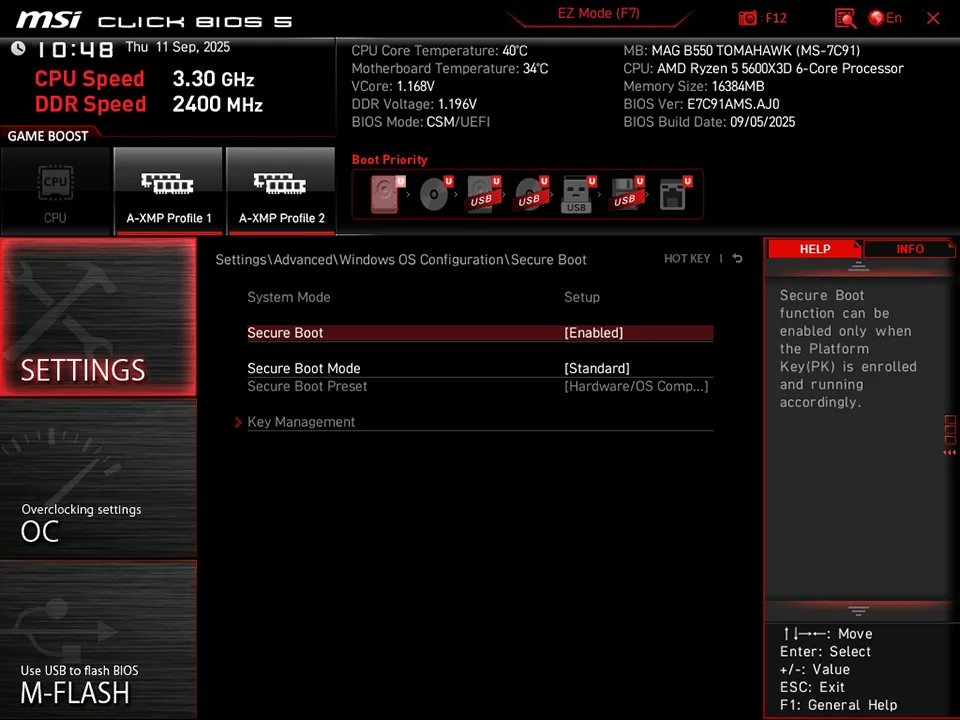
- Open the BIOS, F7 for Advanced modeSettings, Advanced, Windows OS Configuration.
- BIOS CSM/UEFI Mode: UEFIThe Secure Boot option appears.
- Secure Boot: Enabled, F10The BIOS saves and restarts.
Gigabyte
- Press Delete, Advanced ModeOn AMD boards first set Settings, AMD CPU fTPM: Enabled.
- Boot, CSM Support: DisabledSecure Boot appears in the same tab.
- Secure Boot Mode: CustomYes to Install Factory Defaults, Yes to Reset Without Saving. After the restart Secure Boot should read Active.
Gigabyte’s steps cover AM4 and TRX40 boards; on other boards the names can differ.
ASUS notebooks
- Hold F2, press the power buttonRelease F2 when the BIOS appears.
- F7, Security, Secure BootSecure Boot Control: Enabled, then F10.
Common problems
| Problem | What to do |
|---|---|
| Secure Boot State: Unsupported | BIOS Mode Legacy: convert the disk, switch to UEFI. BIOS Mode UEFI: check the manual |
| No Secure Boot option | Turn CSM off. Still missing: update the BIOS |
| On in the BIOS, Off in Windows | Install the default (factory) keys |
Ubuntu boots with Secure Boot through shim, a loader signed by Microsoft that checks GRUB and the kernel (Ubuntu). Drivers built on the PC, such as NVIDIA’s from DKMS, need a key: at the next restart choose Enroll MOK in MokManager, or the driver will not load. More on graphics cards: what a GPU is.
Microsoft’s 2011 certificates expired in 2026
Secure Boot on Windows PCs relies on Microsoft certificates issued in 2011 (Microsoft Support):
| 2011 certificate | Expired | Replaced by |
|---|---|---|
| Microsoft Corporation KEK CA 2011 | June 2026 | Microsoft Corporation KEK 2K CA 2023 |
| Microsoft UEFI CA 2011 | June 2026 | Microsoft UEFI CA 2023, Microsoft Option ROM UEFI CA 2023 |
| Microsoft Windows Production PCA 2011 | October 2026 | Windows UEFI CA 2023 |
A PC without the new ones keeps booting but gets no new boot-level protections. Most receive them through Windows Update, some need a firmware update from the PC or board maker.
FAQ
Does Secure Boot lower FPS?
No. FACEIT says TPM and Secure Boot do not affect performance (FACEIT). Where lag comes from: what latency is.
Can I turn Secure Boot off again?
Yes, in the same menu. The games in the table will not start until it is back on.