In this material
Network latency and ping
Latency on a network is the time data needs to travel from your device to a server and back (HP). The ping command sends a small echo request and prints the round-trip time of each reply (Microsoft Learn). Ping 30 means 30 ms for the trip there and back, roughly 15 ms each way.
Distance sets a minimum that no internet plan removes. A signal covers about a metre of cable in 5 nanoseconds (NVIDIA), 5 microseconds per kilometre, so a server 1,000 km away cannot answer faster than about 10 ms. Real routes are longer than a straight line, and every router on the way adds its share; tracert shows them one by one. Congestion adds more (AWS).
Two more numbers matter in games. Jitter is how much ping jumps: a line swinging between 20 and 90 ms feels worse than a steady 50. Packet loss means some data never arrives, which shows up as rubber-banding (your character snaps back to an earlier spot), missed actions and disconnects (HP). If everyone in your match lags at once, the problem may be the service itself: is Steam down right now.
Input latency: from the mouse to the screen
NVIDIA’s name for the delay between a click and the change of pixels on screen is system latency, and it splits the delay into parts (NVIDIA). The mouse needs time to send the click, the processor prepares a frame, the frame waits in the render queue, the graphics card draws it, and the monitor shows it. Network latency is not part of it.
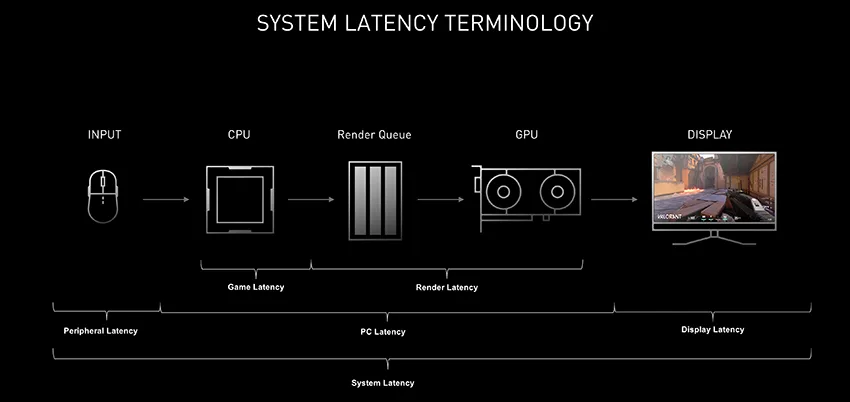
The render queue grows when the processor prepares frames faster than the graphics card can draw them. NVIDIA Reflex, an option in the settings of supported games, times the game’s work so the queue disappears. AMD’s answer is Anti-Lag, a driver setting for Radeon RX 400 cards and newer, and Anti-Lag 2, built into Counter-Strike 2, Dota 2 and Ghost of Tsushima Director’s Cut (AMD). Which card does what: what a GPU is.
The monitor adds its own delay: it waits for the next refresh, then processes the image and the pixels change colour. A 60 Hz screen draws a new frame every 16.7 ms, 144 Hz every 6.9 ms, 240 Hz every 4.2 ms, and NVIDIA calls a higher refresh rate the best way to cut display latency (NVIDIA). The word also turns up in RAM specs: CL there stands for CAS latency, the delay of the memory itself (what RAM is).
Latency, bandwidth and throughput
| Term | What it is | Unit |
|---|---|---|
| Latency | how long data takes to get there and back | ms |
| Bandwidth | the most data the connection can carry per second, the figure of your plan | Mbps |
| Throughput | how much data actually passes per second | Mbps |
A faster plan raises bandwidth and throughput, not latency: AWS lists distance, congestion and the equipment on the way as what sets latency (AWS). That is why a gigabit line still shows a high ping to a server on another continent.
What is a good ping for games?
| Ping | What to expect | Good for |
|---|---|---|
| Under 20 ms | Feels instant | Competitive shooters and esports |
| 20–50 ms | Smooth in almost any game | All online games |
| 50–100 ms | Slight delay in fast games | Casual play, co-op, strategy |
| 100–150 ms | Noticeable delay | Slower games |
| Over 150 ms | Lag and rubber-banding | Not for real-time multiplayer |
The ranges are from HP, October 2026. Cloud gaming has a hard limit: GeForce NOW requires less than 80 ms to an NVIDIA data center (NVIDIA).
How to measure latency
The game’s own network counter shows ping to the match server. System tools test the line in general, and a speed-test website measures ping to its own server, not to the game’s.
Windows
ping steamcommunity.com- 20 requests
ping /n 20 steamcommunity.com- The route, hop by hop, without name lookups
tracert /d steamcommunity.com- Latency and packet loss for each hop
pathping steamcommunity.com
A row of asterisks in tracert is a router that does not answer such requests, not necessarily a fault (Microsoft Learn).
macOS
ping steamcommunity.com- The route, hop by hop
traceroute steamcommunity.com- Speed and responsiveness under load
networkQuality
Ping stops with Control-C and prints a summary with packet loss; 0.0% means every reply came back (Apple).
How to lower latency

- Plug in a cableWired Ethernet gives the lowest and steadiest latency; Wi-Fi suffers from distance, walls and interference. If you stay on Wi-Fi, use 5 GHz.
- Pick the nearest server or regionDistance sets the minimum ping, and no setting removes it.
- Stop downloads on the networkA large download on another computer can fill the line and cause ping spikes; so can streaming on other devices.
- Play without a VPN or proxyRiot advises testing the connection without them.
- Turn on Reflex or Anti-LagThen set the mouse polling rate to 1000 Hz: 125 Hz adds up to 3 ms on average.
For CS2, the settings guide lists the video options that cut input lag.
FAQ
Is latency the same as ping?
Almost. Latency is the delay itself; ping is the tool that measures network latency, and in games the word means that number.
Is 100 ms latency bad?
For a shooter, yes: HP puts 50–100 ms at a slight delay in fast games and 100–150 ms at a noticeable one. Strategy and co-op games play fine.
Does faster internet lower ping?
Not by itself. More megabits help downloads; ping depends on distance, the route and how busy the line is.
Does anti-cheat with Secure Boot add lag?
FACEIT, which requires Secure Boot and TPM 2.0, says they do not affect performance (FACEIT). Why games ask for them: what Secure Boot is.