In this material
Steam has started to show how well a game really runs on Steam Deck. Valve announced it in the post “Steam Deck Framerate” on 10 November 2026, and an update of 11 November says the data is now on the store and in the Steam client, on desktop and on Deck, for everyone.
Where to find it
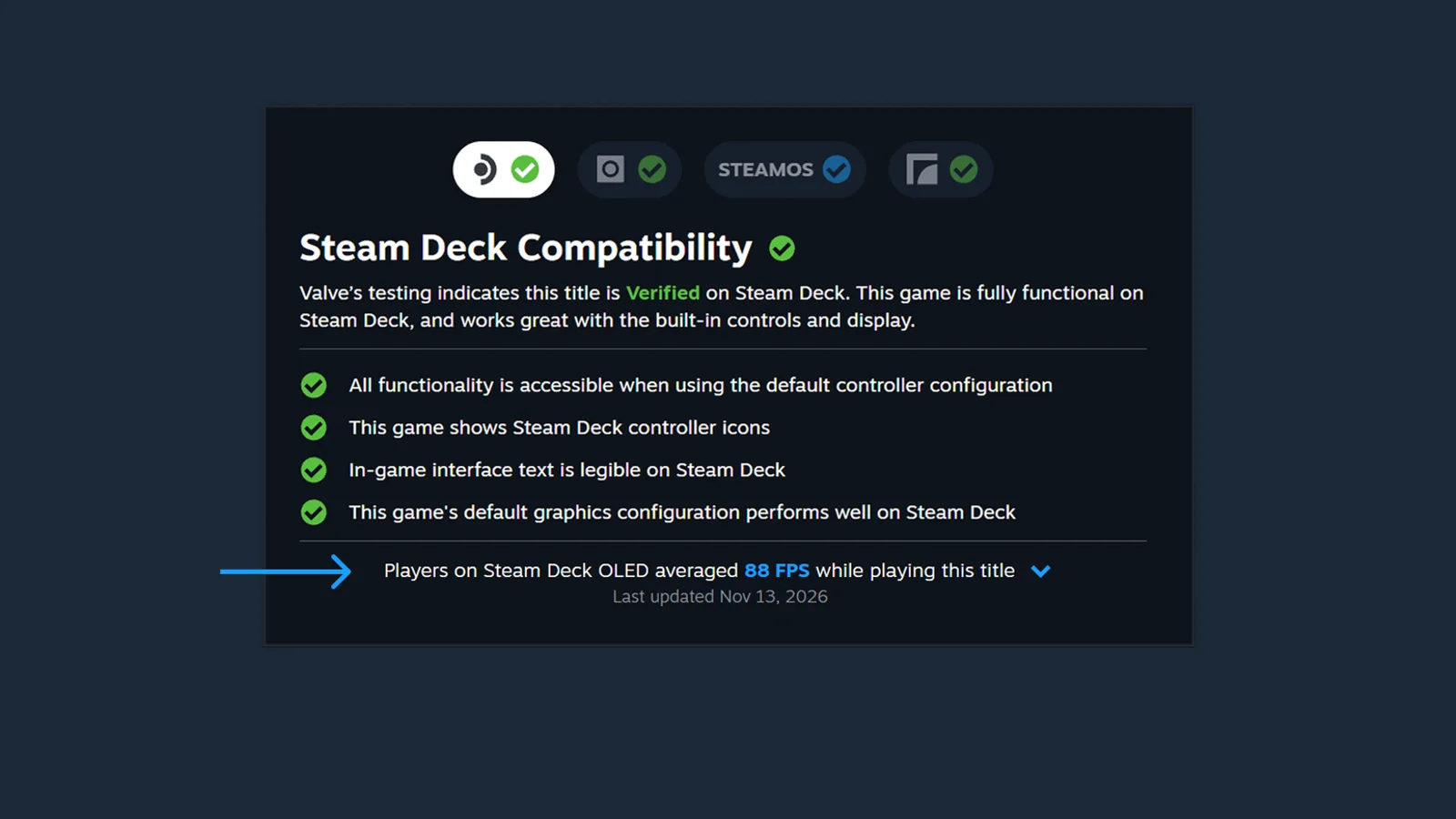
On a game’s store page the figure sits in the Steam Deck Compatibility block, under “Learn more”: a line such as “Players on Steam Deck OLED averaged 88 FPS while playing this title”, as in Valve’s example above. An expandable view adds a histogram with the share of samples at each framerate. Valve notes that small columns at low values show how often players run into hitches or stuttering. The Steam client update of 11 November adds the same average to the Hardware Compatibility dialog.
The data covers games that Valve has tested for Deck: Verified, Playable and Unsupported. At the time of the post there were “thousands” of them, and a game appears only once enough samples have been collected.
How the number is measured
- Default frame limit, Steam Deck OLED
- 90 FPS
- Default frame limit, Steam Deck LCD
- 60 FPS
- Games covered
- Verified, Playable, Unsupported
- Visible to everyone since
- 11 November 2026
The samples come from Steam Deck players who opted in to sharing anonymous framerate data, and Valve says a majority of them have. Only Decks at the default frame limit count, idle time and invalid samples are filtered out, and custom graphics settings are not taken into account. Valve started with Steam Deck because every unit has the same hardware, which makes the data easier to understand.
The reason, by Valve’s account: the Verified rating follows standard test criteria and may not match every player’s bar. A Verified game may run below the framerate someone prefers, and an Unsupported one may be playable enough for others.
What comes next
“We see this update as a stepping stone toward providing framerate data for more devices than just Steam Deck,” Valve writes. The desktop Steam client now asks players to opt in to sending anonymous framerate data as well. “This opt-in is currently only on Steam Client Beta, and will ship to all customers in the future.” The setting is under Steam account settings, Data & Browsing, Anonymous Game Framerate Data. Valve has not said when framerates of desktop PCs will appear on the store.
More news of the store and the client is in the Steam section.